Where can I find statistics for my website?

You can see statistics after 24 hours, since the creation of your webhotel. It's found at http://your-domain.dk/stats (remember to replace your-domain.dk with your own domain name).

    • Username is admin.
    • Password is sent in the welcome mail.


If you've forgotten your password, you'll be able to change it through your eControlPanel. Access the Sites tab and click the domain you wish to check the statistics for, then click the Statistics tab and you'll be able to enter and save a new password.
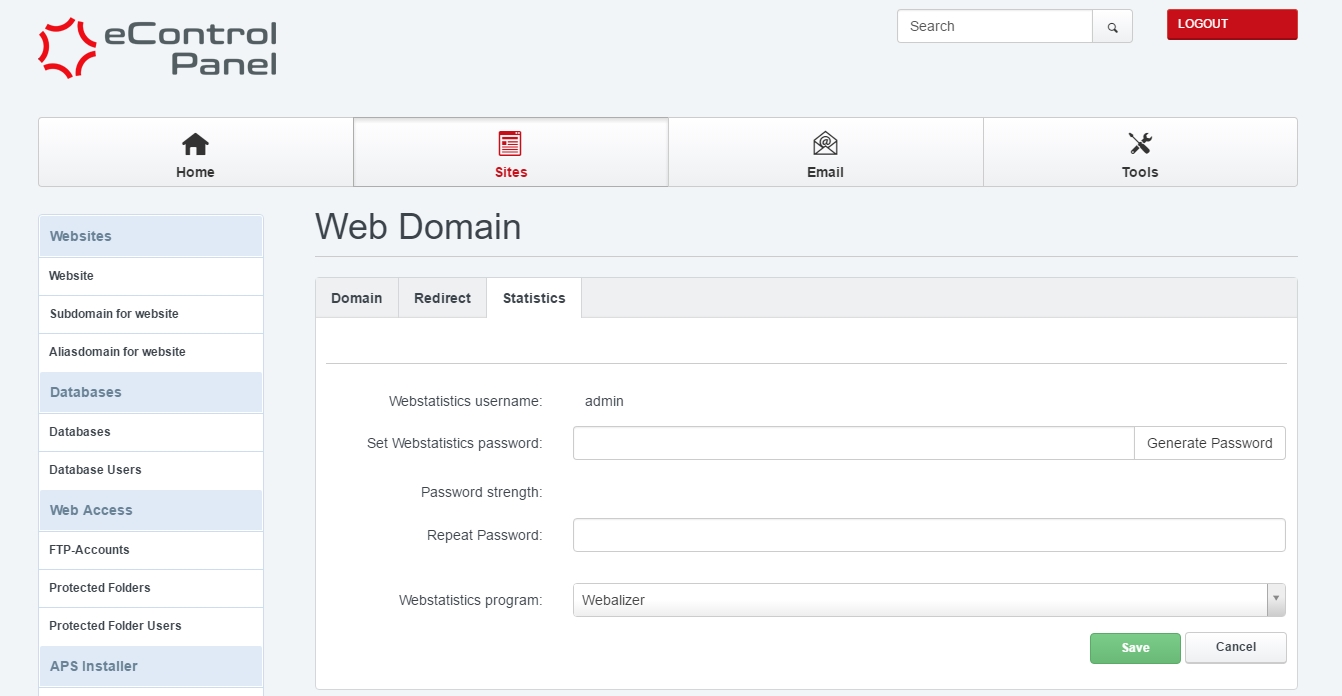


You may see Access denied if you try logging in too soon. Make sure the 24 hours has passed, since the creation of your webhotel.

  • website statistik, website statistics
  • 2 Users Found This Useful
Was this answer helpful?

Related Articles

How do I check traffic and quota in the Control Panel?

You can find the traffic usage in the Control Panel at Email -> Mailbox traffic.The statistics...

I already have a database - how do I import it?

If you have an database created, you can log in to it at RemoteMySQL. Then you click the empty...

What can I do if I forgot my password to the controlpanel?

You can get access to the controlpanel by going to this adresss: http://your-domain.dk:8080....

How do I change the password for my FTP account?

First you'll need to log in to your Control Panel and access the tab Sites -> FTP-Accounts....

How do I log in to my Control Panel?

Before you begin We refer to your-domain.dk in this guide. It is to be replaced by your own...