How do I change the password for my FTP account?

First you'll need to log in to your Control Panel and access the tab Sites -> FTP-Accounts. Then click the desired user.

Under Password you can either type a password yourself or click Generate Password to generate a secure password.

Then click Save.
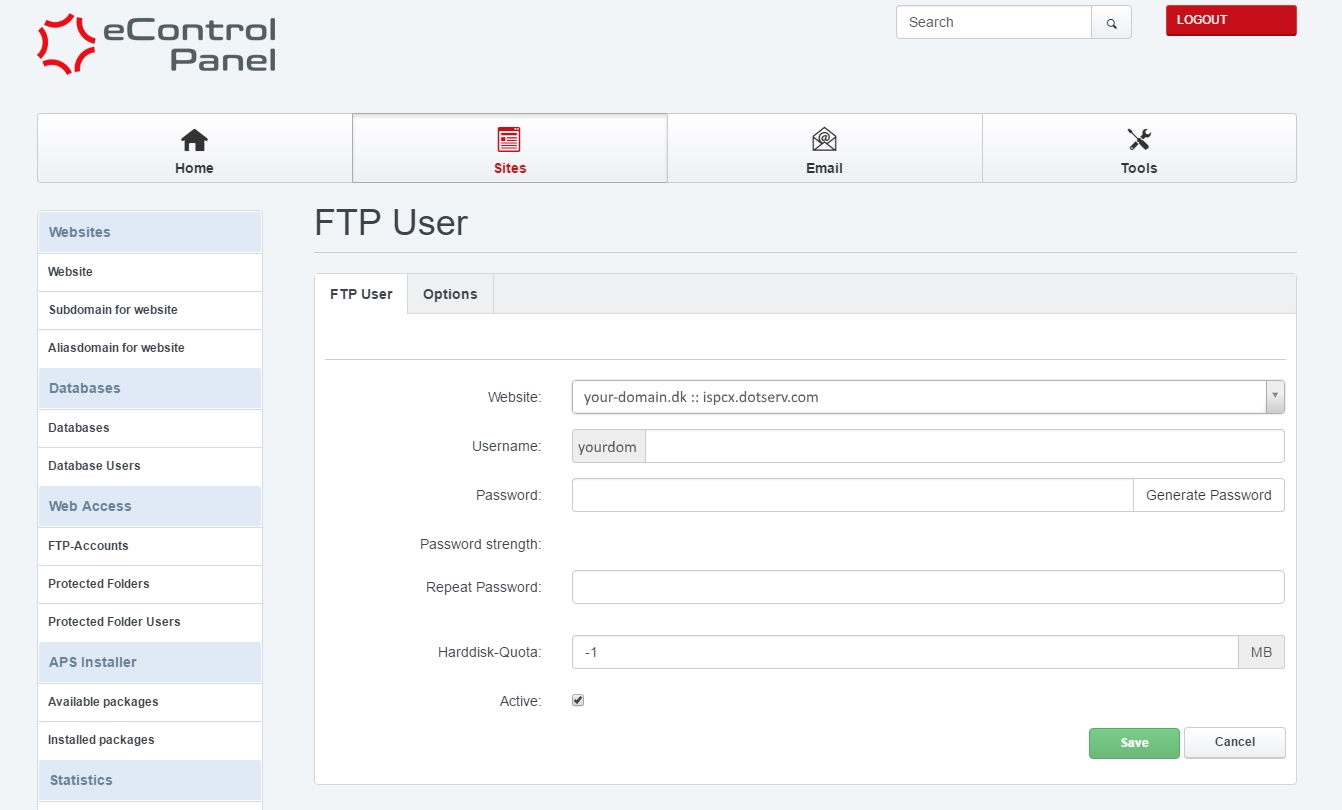
Create FTP user


You can test your FTP account after a couple of minutes, by logging in with your preferred FTP client. Remember to place your files in the web folder.

  • ftp, ftp password, ftp adgangskode
  • 5 Users Found This Useful
Was this answer helpful?

Related Articles

How do I check traffic and quota in the Control Panel?

You can find the traffic usage in the Control Panel at Email -> Mailbox traffic.The statistics...

I already have a database - how do I import it?

If you have an database created, you can log in to it at RemoteMySQL. Then you click the empty...

What can I do if I forgot my password to the controlpanel?

You can get access to the controlpanel by going to this adresss: http://your-domain.dk:8080....

How do I log in to my Control Panel?

Before you begin We refer to your-domain.dk in this guide. It is to be replaced by your own...

How do I create a new FTP user?

First you'll need to log in to your Control Panel and access the tab Sites -> FTP-Accounts....