How do I get an EPP-/auth-code for a .dk domain at punktum.dk?

If you want to transfer a .dk domain to us please login to https://self-service.punktum.dk


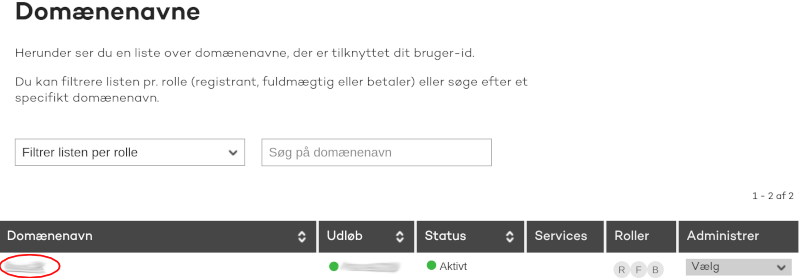
1) Click on the desired domain name in your domain overview.


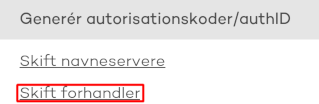
2) Then click on Change registrar in the menu at the right.


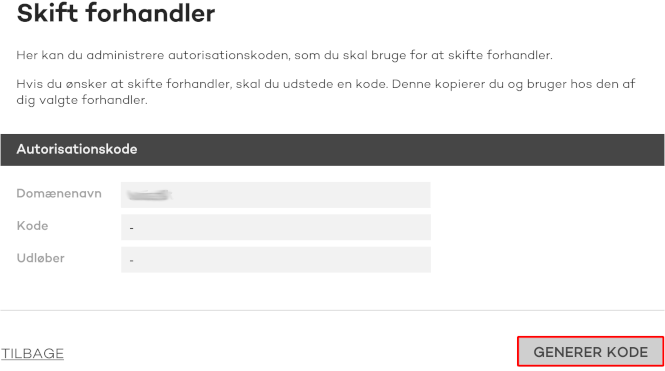
3) Click on Generate code at the bottom left to generate a new EPP-/auth-code.


You can use this code to move the domain name to us which can be done here.

  • 0 Users Found This Useful
Was this answer helpful?

Related Articles

Can I use international domains (.com, .net or .dk), with æ, ø and å?

It's possible to register .com, .net and .dk (for example) domains with international characters...

How do I report domain abuse/complaints?

Please use these details to contact us for any domain name related queries you may have,...

I have ordered my domain name, when can I use it?

We complete the orders, right as we receive them (also on weekends), so that the domain won't be...

How do I order a domain name?

Visit our domain search at enavn.dk, to check the availablity of your desired domain name and...

How do I transfer my domain name to enavn.dk?

Visit the domain search and insert your full domain name in the search field. When your domain...